Author: LK

  • What I recently learned About Agentic AI

    During the first session of the BeSA program I got hands-on with Amazon Bedrock Agents and built a fully working AI shopping assistant from scratch. Here’s what shifted in my thinking.

    February 2026  ·  7 min read

    Amazon Bedrock Agentic AI AWS Lambda RAG Multi-Agent BeSA

    There’s a concept that sounds obvious once you hear it, but takes hands-on experience to really internalize: the difference between AI that answers and AI that acts.

    That was the core of what we explored during the first session of BeSA Batch 09 — and it changed how I think about building with AI.

    From GenAI to Agentic AI: a shift in paradigm

    Standard Generative AI is a brain. Ask it to plan a trip and it’ll give you a beautiful itinerary — but it leaves the actual booking to you. Agentic AI adds hands to that brain. The main difference is the shift from “responding” to “doing.” GenAI plans and answers. Agentic AI plans and executes — using an LLM as a decision center, equipped with tools like APIs, databases, and Lambda functions that let it act autonomously.

    “Agentic AI isn’t a trend — it’s a paradigm shift. From tools that help us write, to systems that do the work for us.”

    Think of a football manager. His goal is to win the match (the user prompt). He reads the game, sets the tactics, decides which players to put on the pitch and when — and when the plan stops working, he adjusts at half-time. He doesn’t kick the ball himself, but every outcome depends on his decisions. A well-built AI agent works exactly the same way: it receives the goal, figures out which tools to deploy, orchestrates the execution, and replans when something unexpected happens.

    The anatomy of an agent

    An AI agent isn’t magic — it’s four things working together:

    1. The Brain (LLM) — responsible for reasoning and decision-making. The choice of model matters enormously: in this workshop, Claude 3.5/4.5 Sonnet was recommended specifically because of how well it handles task orchestration.

    2. Planning & Orchestration — the ability to break a complex goal into steps and correct course in real time. This is what separates an agent from a simple chatbot.

    3. Tools (Action Groups) — the connection to the outside world. API calls, Lambda functions, database queries. This is where the agent stops talking and starts doing.

    4. Memory — context from previous interactions so the agent doesn’t repeat itself, doesn’t ask for the same information twice, and can learn from what’s already happened in the session.

    ·

    Building it in Amazon Bedrock

    The workshop was a hands-on implementation of all of the above. The goal: build a conversational shopping assistant that could recommend gifts, manage a cart, personalize upsells, answer questions about gift wrapping, and — in the final section — delegate work to specialized sub-agents.
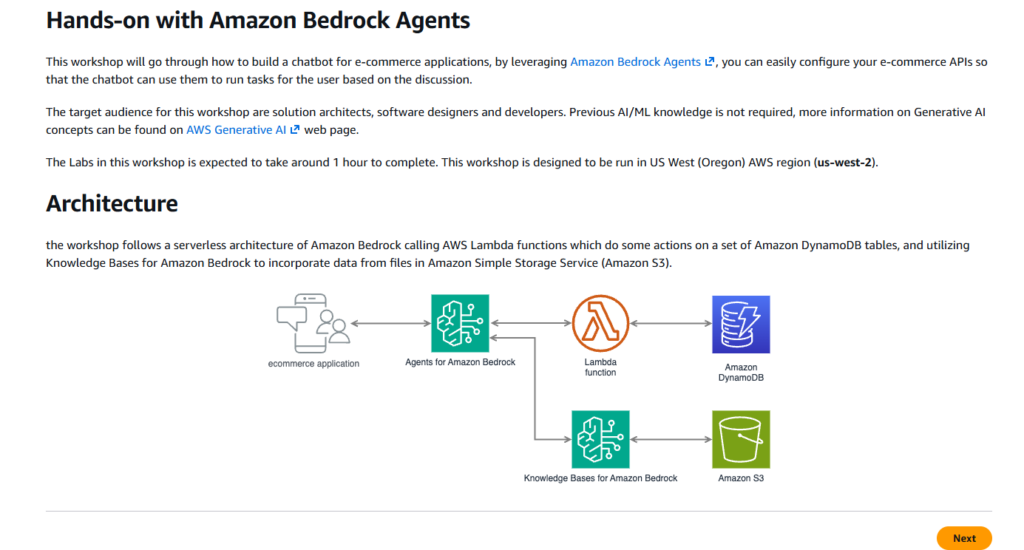
    All of it on a serverless AWS stack.

    The starting point was creating an agent in the Bedrock console, selecting Claude Sonnet 4.5 as the model, and writing the system prompt — the instructions that define the agent’s role and boundaries. One of the key lessons: don’t rush, and read carefully. A vague prompt produces a vague agent. Precise instructions about when to call a tool, how to handle missing parameters, and what never to reveal to the user — that’s what separates a good agent from a frustrating one.

    Action Groups: connecting the agent to the real world

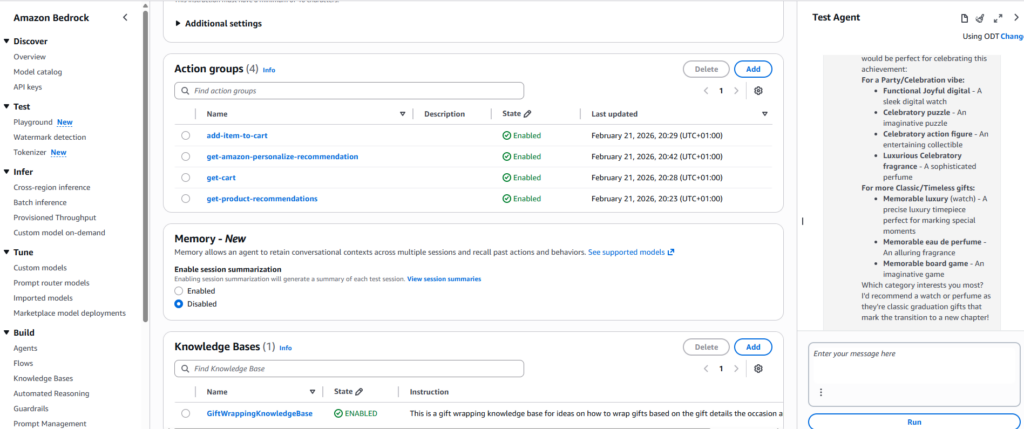
    Each capability was added as an Action Group — a binding between the agent’s reasoning and a Lambda function. The agent learned to call a products API to filter by gender, occasion, and category. Then a cart API to add and retrieve items. Then a Personalize API to surface “customers who bought this also bought…” recommendations automatically after every cart addition.

    The agent didn’t follow a fixed script for any of this. It reasoned about the conversation, decided which tool to invoke, constructed the right parameters, and presented the result naturally.

    Knowledge Bases and RAG

    Not all useful information fits in an API. For gift wrapping ideas, the workshop introduced a Knowledge Base backed by a plain text file in Amazon S3. Using Retrieval Augmented Generation, the agent could pull relevant passages from that document and weave them into responses — grounded in real content, without any model retraining. A fully managed RAG pipeline, ready in minutes.
    Multi-Agent Collaboration

    The most architecturally interesting section was the last one. Instead of one agent doing everything, I built three: a product specialist, a cart specialist, and a supervisor that coordinates them. The supervisor routes requests to the right sub-agent and shares conversation history between them — so the cart agent knows which product was selected three messages ago without the user having to repeat themselves.

    Multi-agent isn’t just a scaling trick. Specialized agents are easier to test, update, and reason about in isolation. It’s a cleaner architecture for anything non-trivial — and it’s how you’d build this for production.

    The agent in action
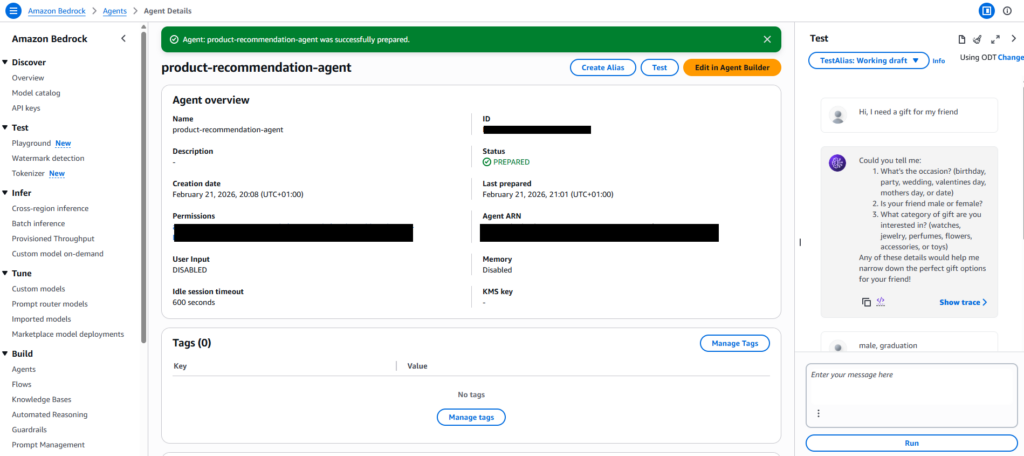
    The screenshot above captures something that required a lot to make work: the agent asked the right questions to narrow down its API call, then returned a curated list — not a database dump. That’s the difference between a search interface and an assistant.

    The trace inspector in Bedrock was the most valuable debugging tool. Expanding any response reveals the agent’s raw reasoning: which action group was invoked, what parameters were sent to Lambda, and how the result was interpreted. Real observability into the model’s decision-making. It also drives home why model selection matters — the same configuration with the wrong model can simply stop working.

    “Traces let you see why the agent did what it did. That’s not just a debugging feature — it’s a design tool.”

    What this means going forward

    We’re in what feels like a golden era for solution architects. Agentic AI doesn’t replace the architect — it gives the architect a new class of building block. One that can reason, plan, call APIs, retrieve context, and collaborate with other agents. The patterns we reach for when designing autonomous workflows are changing fast.

    The practical things I’ll carry forward: write precise agent instructions. Use traces to understand behavior, not just whether it works. Pick the right model for orchestration. And think in systems — a supervisor coordinating specialists will almost always beat one overloaded generalist agent.

    Workshop: Build a product recommendation chatbot with Amazon Bedrock Agents — AWS Workshop Studio  ·  BeSA Batch 09
  • Building a Marketing Data Platform

    Building a Marketing Data Platform

    How we connected 30 price comparison APIs, BigQuery, and Azure to create a unified marketing data hub

    How we connected 30 price comparison APIs, BigQuery, and Azure to create a unified marketing data hub

    In today’s performance marketing, data isn’t just numbers — it’s decisions, budgets, and actual revenue.
    But what if your cost data is scattered across dozens of different sources?

    In this project, we set out to solve that problem by building an end-to-end marketing data platform that connects cost data from 30+ price comparison websites, advertising platforms, CRM systems, and analytics exports into one unified ecosystem.


    🧩 Project Overview

    Our main goal was to create a central tool for marketing cost integration and attribution — a system that both marketing and category managers could rely on.

    We aimed to:

    • eliminate data silos between marketing channels,
    • automate data collection and processing,
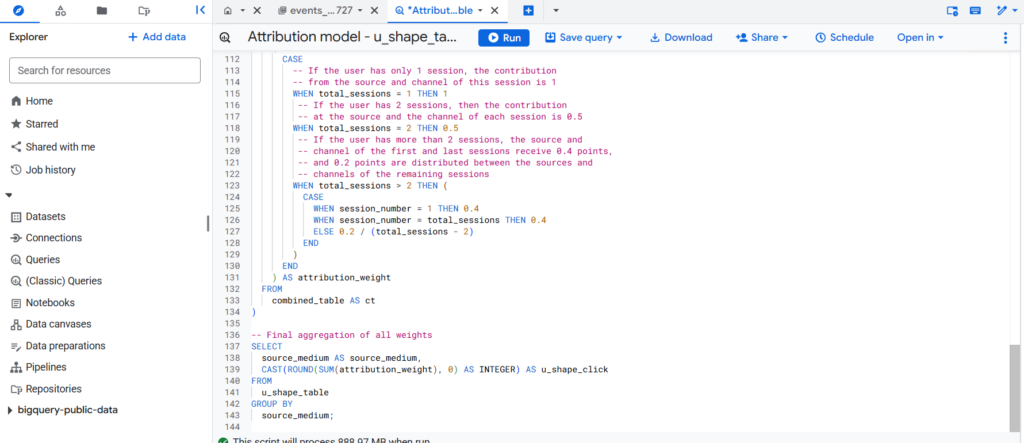
    • and implement consistent attribution models (Last Click, Time Decay, U-Shape).

    ☁️ Architecture at a Glance

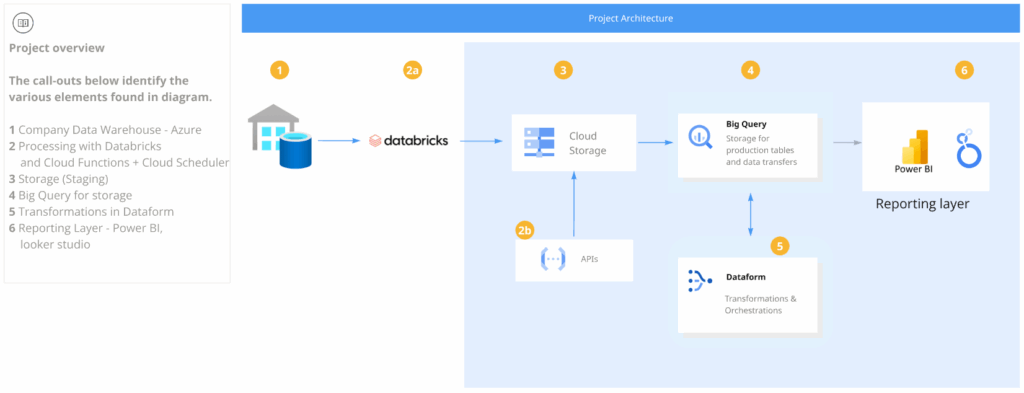
    Below is a simplified overview of the system architecture:

    1. Company Data Warehouse (Azure) – primary source for CRM and product data.
    2. Processing Layer – Databricks & Cloud Functions – collects and processes external API data.
    3. Storage (Staging) – Google Cloud Storage – intermediate Parquet data layer.
    4. BigQuery – main analytical data warehouse.
    5. Dataform – for data modeling and orchestration.
    6. Reporting Layer – Power BI & Looker Studio – final dashboards for business users.

    🔄 From APIs to Insights — How the Data Flows

    1. Collecting Cost Data

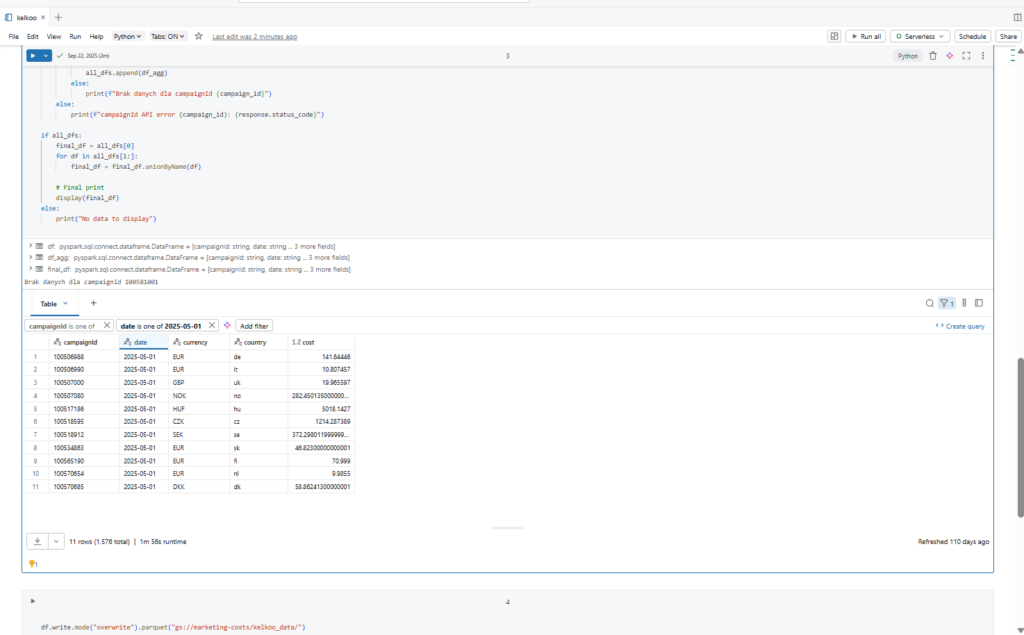
    We pull cost and performance data from 30+ price comparison APIs (including Kelkoo, Zbozi, Ceneo, and others).
    Data ingestion and normalization happen in Databricks, allowing us to scale workloads and parallelize API calls efficiently.

    2. Storage & Integration

    All raw data is saved in Parquet format inside Google Cloud Storage (staging) for efficient querying and downstream use.

    Next, we load this data into BigQuery, where it’s joined with:

    • GA4 export tables,
    • Google Ads and Facebook Ads cost data,
    • and product data from Azure Data Warehouse.

    3. Data Modeling & Attribution

    Inside Dataform, we orchestrate and model the data transformations.
    This includes:

    • standardizing table structures,
    • unifying cost and revenue sources,
    • and enriching with attribution models — Last Click, Time Decay, and U-Shape.

    This gives us a unified, transparent view of marketing efficiency across all channels.

    4. Currency Exchange Module

    To ensure accuracy across multiple currencies, we built a Currency Exchange module using Google Cloud Functions.
    It periodically fetches exchange rates from the NBP API and updates BigQuery tables automatically.


    📊 Reporting & Business Value

    We separated the reporting layer by user needs:

    • Looker Studio → for marketing teams: performance dashboards, CPC, ROI, and attribution analysis.
    • Power BI → for category managers: product- and margin-oriented reports, combined with CRM insights.

    This architecture enables business teams to:

    • see complete marketing costs in one place,
    • make faster budget decisions,
    • and manage cross-channel attribution with confidence.

    🚀 What’s Next

    Future development areas include:

    • Anomaly detection and alerting for cost spikes,
    • introducing a data-driven attribution model,
    • and deeper automation within Dataform and Databricks.

    💡 Takeaways

    This project shows how a modern, cloud-based data stack can unify scattered marketing sources into a single, actionable platform.
    Instead of juggling CSV exports and spreadsheets, we now have a scalable, automated, and transparent system that empowers teams to focus on insights — not data cleaning.

  • E-commerce webanalytics solution

    E-commerce webanalytics solution

    How we unified GA4, Google Ads, and Search Console in Dataform for true product analytics

    In e-commerce, seeing beyond “traffic” means connecting data from every digital channel — not just knowing that a product is visible, but understanding how it performs in organic search (SEO), paid campaigns (SEM), and on-site conversion.
    This project was designed to break the country-or-channel silo, enabling unified product analytics across SEO, SEM, and website behavior for all our countries at once.

    🧩 Project Overview

    The goal:
    Create an integrated analytics platform that joins Google Analytics 4 (GA4), Google Ads, and Search Console data for product-level insights, covering all markets.
    Key objectives:

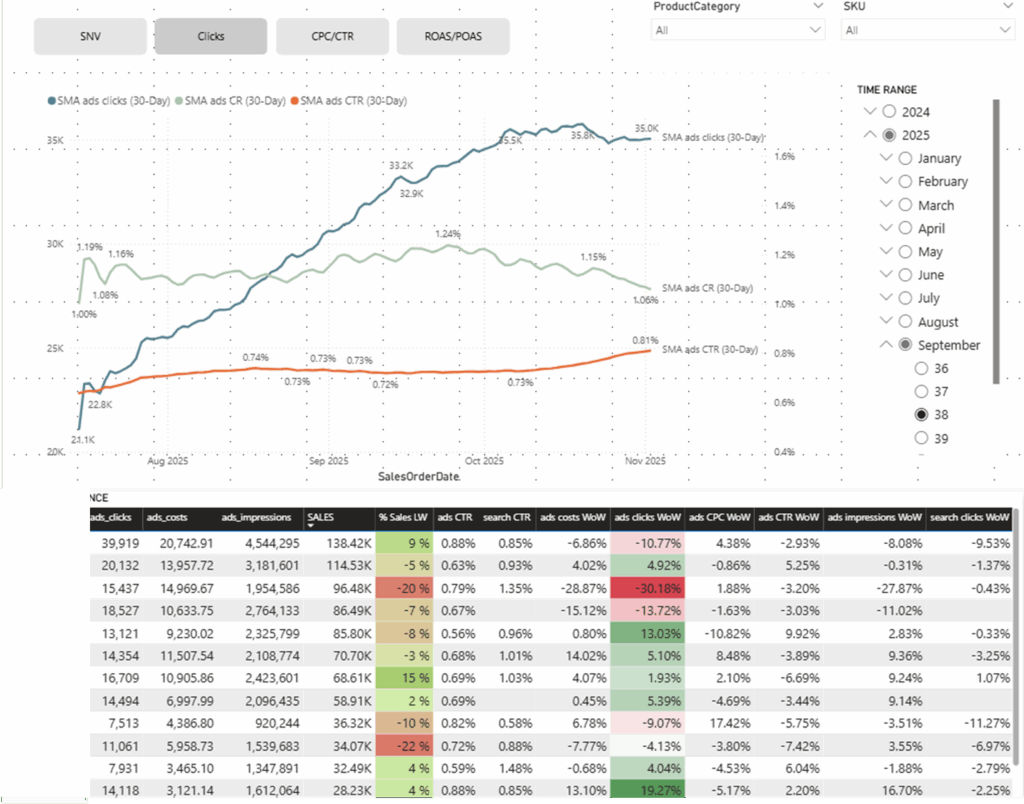
    • Analyze product performance in organic search (Search Console), paid ads (Google Ads), and website behavior/conversions (GA4).
    • Enable merchandising, recommendations, and assortment decisions based on real data — not guesses.
    • Optimize ad budgets toward the products and categories with the highest ROI.

    ☁️ Architecture at a Glance

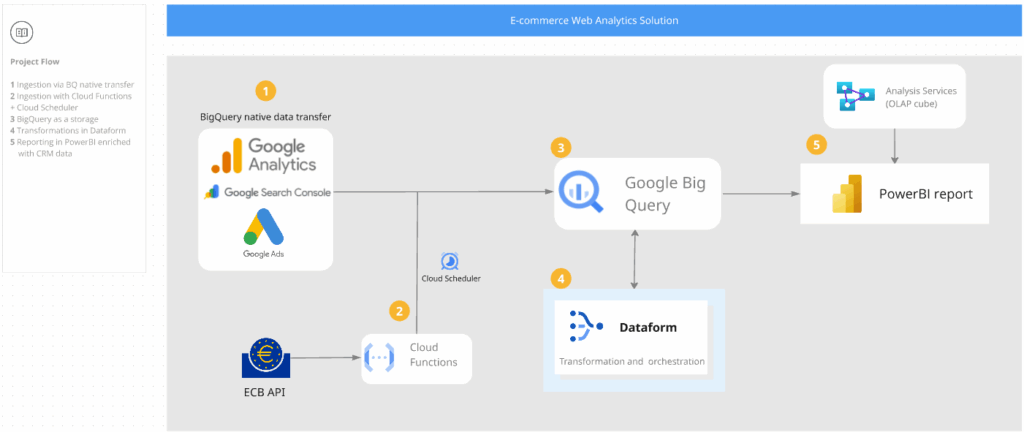
    Architecture stack overview:

    • BigQuery: All analytical tables (nested & repeated fields; ~35M rows) — product, event, stock & price history.
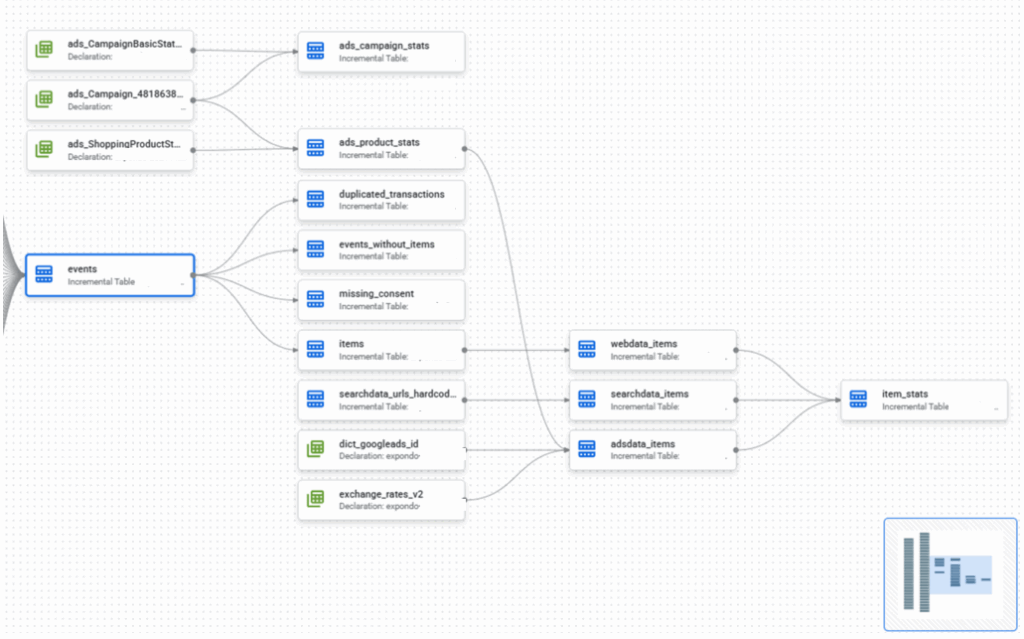
    • Dataform: Data modeling, orchestration, and incremental loads; custom scopes for events, items, and content grouping.
    • GA4 Export: Unified schema for all projects and countries, including e-commerce data and custom channel grouping.
    • Google Search Console: Visibility and click data, product-matched.
    • Google Ads: Campaign costs, conversions; changes ongoing for full product-level matching.
    • Dashboarding: Aggregated views for category managers and marketers.

    🔄 From Raw Sources to Unified Product Insights

    Data Ingestion & Storage

    • Weekly exports from GA4, Search Console, and Google Ads into BigQuery, using Dataform’s incremental logic to avoid duplicates and maximize query efficiency.
    • Product, stock, and price history stored as STRUCT/ARRAY types, leveraging nested fields for massive row count reduction (~35M vs. 175M in legacy designs).

    Data Modeling & Transformation

    • Event and item scopes implemented in Dataform, allowing detailed analysis by channel, content group, and custom dimensions.
    • Unified product info combined with ad spend/clicks and SEO visibility.
    • Currency conversion and multi-country logic established; assertions handle duplicate transactions, bot traffic, and missing consent.

    Quality & Observability

    • Dashboards include tracking quality checks: e-commerce event completeness, pages with high bounce rates or 404 errors, and data consistency between sources.
    • Automated tests verify item/event coverage across all domains each week.

      📊 Reporting & Impact

      With integrated data, we gained:

      • A single view of product performance across SEO, SEM, and UX for all markets, not just one at a time.
      • The ability to identify top-converting items and shift ad budgets in real time.
      • Improved merchandising — data-driven recommendations for assortment and promotions.
      • Greater tracking observability: faster detection of data gaps, broken pages, bot issues.

      🚀 What’s Next

      Planned improvements:

      • Full rollout of Search Console integration for all product SKUs.
      • Data-driven attribution enhancements using advanced models in Dataform.
      • More automated observability checks (consent, bot, currency anomalies).
      • Optimization of Google Ads transfer for deeper product-level analytics.

      💡 Takeaways

      This integrated stack now gives the team the ability to analyze and act on real product-level data from every major channel.
      Instead of manually switching queries and reconciling exports for each country, we have a unified, scalable solution — one that supports marketing, merchandising, and tracking teams across the business.
      It’s a major step forward for e-commerce analytics.

    1. Loyalty program evaluation

      Loyalty program evaluation

      Close cooperation with cross-functional teams, including product development, IT, marketing, content, to align data analysis efforts with business goals and priorities and provide data-driven insights to support decision-making across departments