
During Week 5 of the BeSA (Be a Solutions Architect) programme, I had the chance to go deep on a topic that has been on every AI engineer’s lips for months: the Model Context Protocol. This post is my attempt to consolidate the key takeaways — and, more interestingly, to sketch out a practical application of FastMCP in my own domain: football analytics.
What is MCP and Why Does It Matter?
For years, integrating LLMs with external tools looked like a minefield: every connection was a bespoke, one-off project. MCP changes the rules of the game fundamentally.
| The USB-C analogy: instead of building a custom cable for every device, you get one universal standard. MCP does the same for AI — you build a tool once, and it works everywhere (Claude Desktop, Bedrock, VS Code, and beyond). |
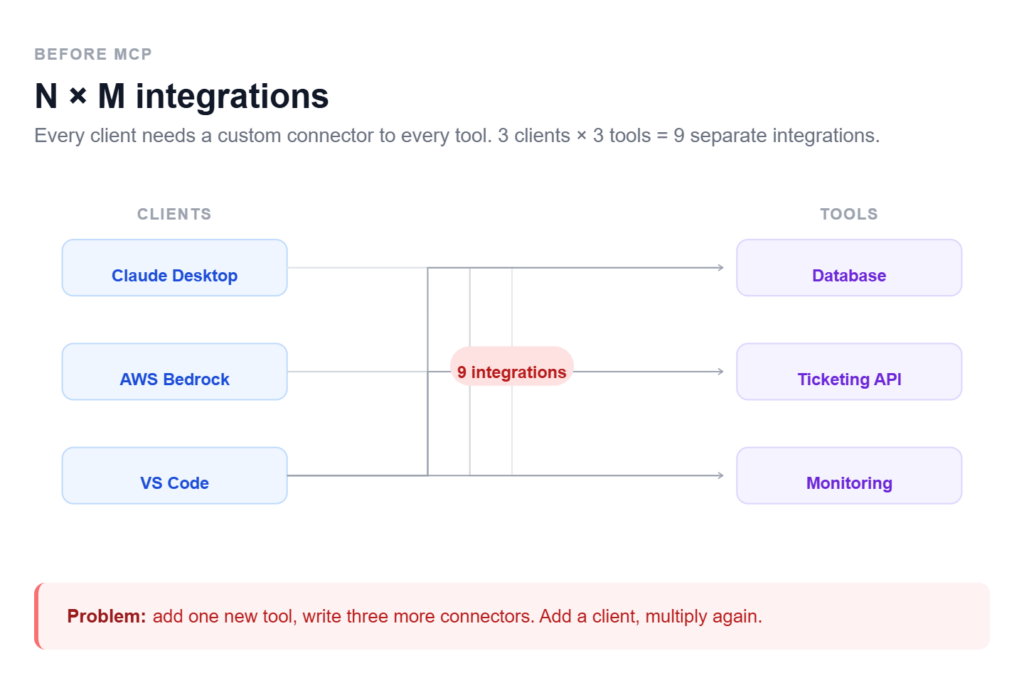
The core shift is from N×M (every client × every tool = a separate integration) to N+M (every client + every tool connects through a shared protocol). For an architect, that means dramatically simpler systems and the ability to compose battle-tested components instead of reinventing the wheel each time.
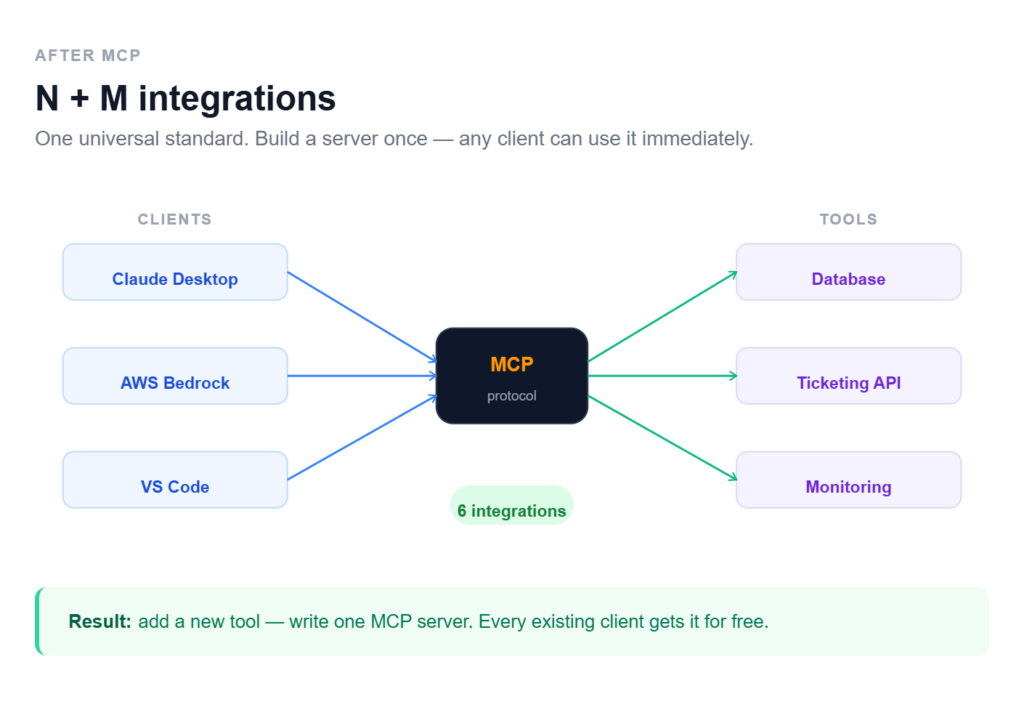
Architecture: Host, Client, Server
The MCP system rests on three layers:
- Host — the main AI application (e.g. Amazon Bedrock). This is where the LLM lives.
- Client — manages connections to MCP servers and brokers communication.
- Server — a specialised module that knows how to talk to a specific system (a database, a ticketing API, a monitoring platform).
On top of that, the protocol defines three core primitives:
| Primitive | What it does | Example |
| Tools | Functions the agent can invoke. Descriptions must be precise — the LLM uses them to decide when to call a tool. Vague descriptions lead to unpredictable behaviour. | create_ticket(), get_player_stats() |
| Resources | Read-only data attached to the agent’s context. | IT policies, architecture diagrams, CSV reports |
| Prompts | Reusable templates that structure user interactions. | Incident triage template, match report template |
Deployment on AWS: Lambda vs Bedrock Agent Core
The workshop highlighted two primary deployment patterns for MCP servers on AWS, with very different profiles:
- AWS Lambda: the right choice for simple, stateless tasks that finish within 15 minutes. Cost-effective and easy to wire up with other AWS services. The natural entry point for your first MCP implementations.
- Bedrock Agent Core: designed for production-grade, stateful sessions at enterprise scale. Supports long-running tasks (up to 8 hours), provides session isolation, and handles complex authentication natively. This is where you go when the contract includes an SLA.
| My take: Lambda is perfect for prototyping and internal integrations. Bedrock Agent Core enters the picture when the customer’s business genuinely cannot afford failures — and needs auditability to prove it. |
Security as “Job Zero”
One of the most valuable threads of the session was the treatment of security — not as an afterthought, but as the foundation of every design decision. Three practices stood out:
- Principle of Least Privilege: every MCP server receives exactly the IAM permissions it needs, and nothing more. A monitoring server gets read-only access. No exceptions.
- Human-in-the-Loop: destructive or irreversible actions (deleting resources, modifying records) require explicit human confirmation. Automation has limits, and those limits should be designed, not discovered.
- Input Sanitisation: never trust AI output blindly. Every incoming parameter must be validated — especially in contexts where SQL injection or prompt injection are realistic attack vectors.
The Solution Validation Framework
As a future Solutions Architect, the most practically useful part of the workshop was the 5-check framework for validating AI-generated architectures. Worth committing to memory:
- Context Check — does the AI actually understand the specific business reality of this customer?
- Security & Compliance — are PCI/GDPR requirements fully covered, or are there gaps?
- Cost Reality — is this architecture financially viable, or does it look good on a whiteboard and bankrupt the client in prod?
- Feasibility — does the customer’s team have the skills to implement and operate this?
- Value Alignment — does it solve the real business problem, or is it just technically elegant?
| Point 5 (Value Alignment) is the one junior engineers most often skip. AI can generate a microservices architecture for a problem that SQLite would solve in a weekend. Our job is to tell the difference. |
🏆 Practical Application: FootballMCP — an AI Football Analytics Assistant
Theory is one thing, but I learn best through examples from my own domain. I’m a football fan and an amateur stats enthusiast — so the natural question was: how would I use FastMCP to build a real analytical tool?
Imagine a tool that lets a coach or journalist ask questions in plain language, while under the hood it orchestrates data from several sources simultaneously.
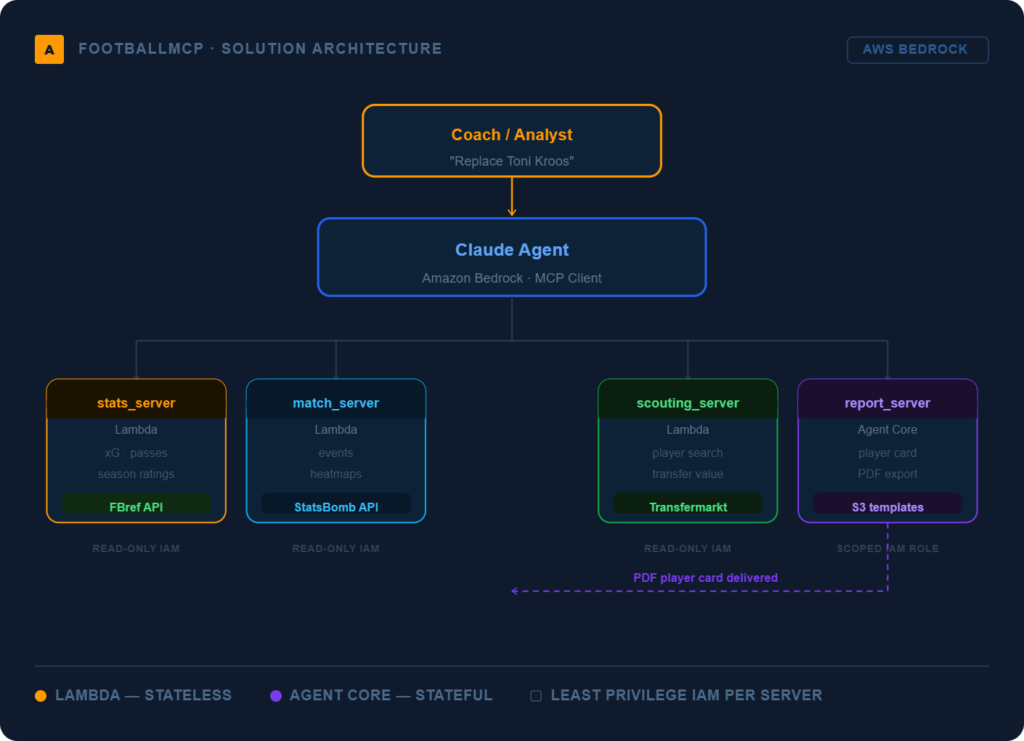
FootballMCP Architecture
The system is composed of four specialised MCP servers:
| MCP Server | Tools / Resources |
| stats_server | get_player_season_stats(player, season), get_team_xg(team, league), compare_players([players]) |
| match_server | get_match_events(match_id), get_heatmap_data(player, match), get_lineup(match_id) |
| scouting_server | search_players_by_profile(position, age_range, min_metric), get_transfer_value(player) |
| report_server | generate_match_report(match_id), generate_player_card(player), export_to_pdf(report) |
Example flow: “Find me a central midfielder to replace Toni Kroos”
Here is how the MCP agent orchestrates an answer to that single question:
- scouting_server.search_players_by_profile(position=’CM’, age_range=[22,28], min_progressive_passes=8)
- stats_server.compare_players([kroos_id, …scouting_results])
- stats_server.get_player_season_stats() for each candidate
- report_server.generate_player_card() → polished PDF report with charts
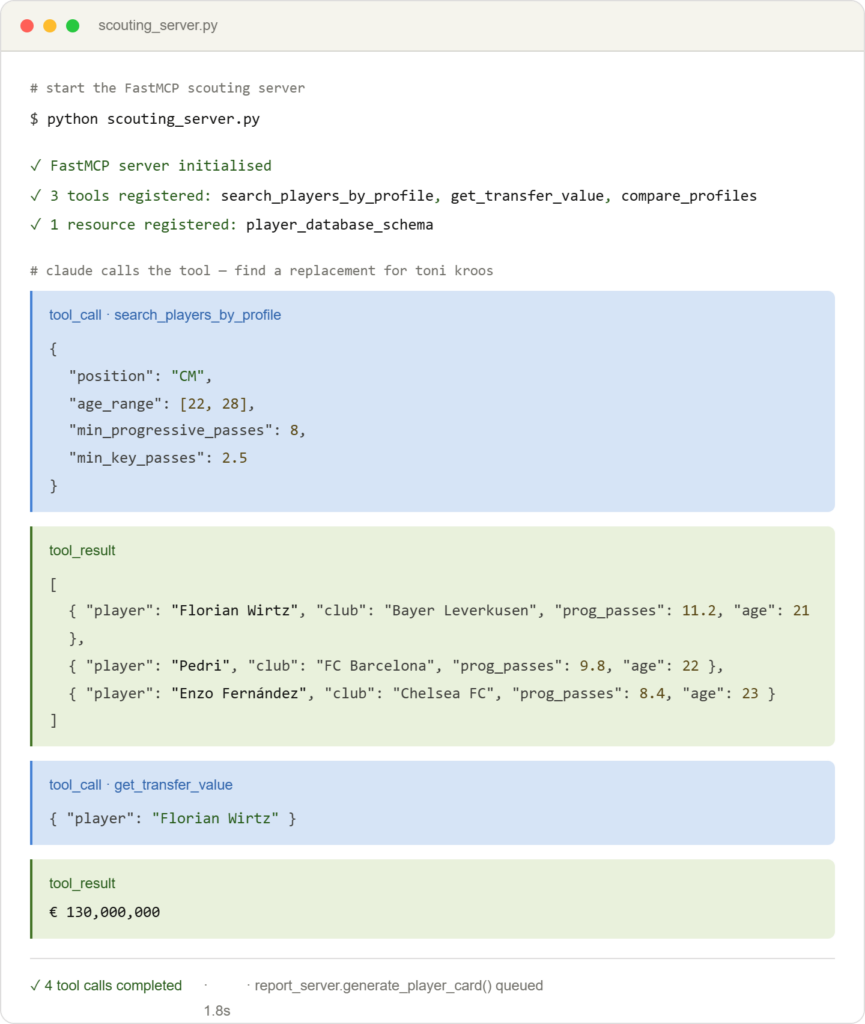
The key point: each server is an independent unit with its own permissions. The stats_server gets a read-only API key for the statistics provider. The report_server gets access to the S3 bucket with report templates. Neither has access to the other’s resources.
This is a direct application of the Principle of Least Privilege learned in the security section — not as a compliance checkbox, but as a genuine architectural boundary.
Why Does This Architecture Make Sense?
- Composability: each server can be plugged into different clients — Claude Desktop, Cursor, a custom web app — without modification.
- Testability: each server can be tested in isolation. FastMCP + pytest means fast, reliable tool tests before anything hits production.
- Extensibility: new data provider (say, Opta instead of StatsBomb)? You swap the implementation of one server. The rest is untouched.
- Security boundary: expensive API keys for premium data services live in exactly one server, not scattered across the codebase.
Key Takeaways and What’s Next
BeSA Week 5 crystallised a few important things for me:
- MCP is not hype — it is a genuine standardisation that simplifies the architecture of AI-powered systems.
- The architect’s value lies not in generating code, but in deciding what to build, how to scope it, and how to defend the design to sceptical stakeholders.
- FastMCP lowers the barrier to entry to the point where a single developer can have a working server running in a few hours.
- Security-first is not optional — it is a precondition of every production implementation.
Leave a Reply